Synology QuickConnect Guide for Secure NAS Access

Introduction to Synology QuickConnect
Synology QuickConnect has become one of the most popular remote access solutions for NAS users who want simple, secure, and reliable access to their files from anywhere in the world. As cloud storage demand continues growing, many individuals and businesses are searching for alternatives that provide better privacy, stronger control over data, and long-term cost savings. Synology NAS devices combined with QuickConnect offer a private cloud environment that removes much of the technical complexity usually associated with remote networking. Instead of depending entirely on third-party cloud services, users can create their own personal storage ecosystem while still enjoying easy online accessibility.
The main purpose of Synology QuickConnect is to allow users to connect to their NAS devices without configuring advanced networking settings such as manual port forwarding, static IP addresses, or complex firewall rules. Through a simple QuickConnect ID, users can log into DSM, access files, stream media, and manage applications remotely. This feature has made Synology NAS systems highly attractive for beginners, home users, content creators, remote workers, and small businesses. Search terms such as Synology NAS remote access, DSM login, QuickConnect setup, personal cloud storage, and Synology remote file sharing are now widely associated with modern NAS technology because users increasingly want secure remote access without depending on public cloud platforms.
Understanding How Synology QuickConnect Works
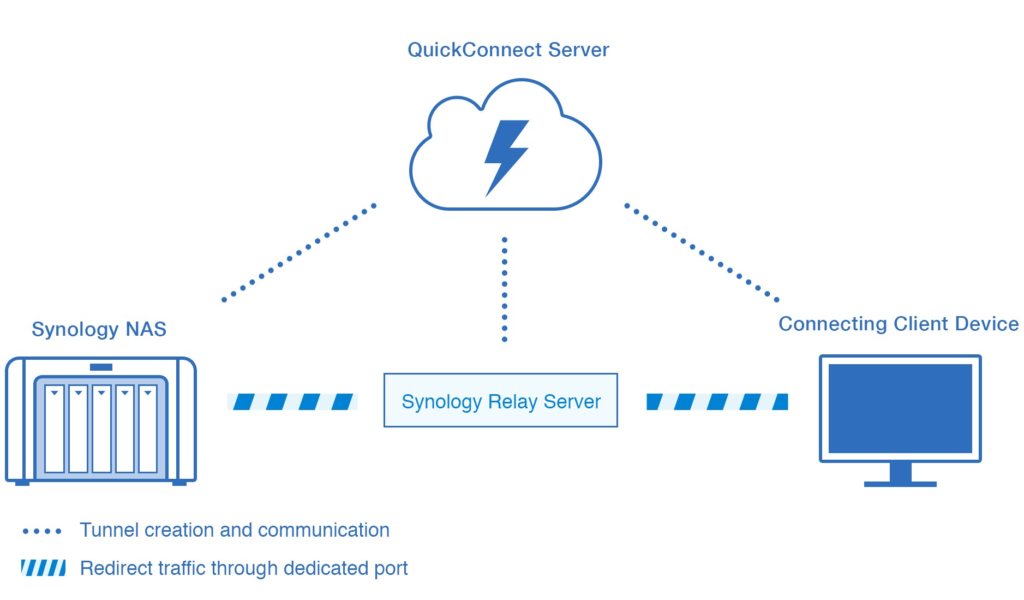
Synology QuickConnect works by establishing a connection pathway between the user and the NAS through Synology’s networking infrastructure. When users enable QuickConnect inside DiskStation Manager, the NAS registers with Synology servers and creates a unique QuickConnect ID. Instead of requiring users to memorize IP addresses or manually manage networking configurations, the service creates a simplified access point that works across browsers, desktop applications, and mobile apps.
The technology behind QuickConnect intelligently attempts to establish direct communication whenever possible. If direct peer-to-peer communication fails because of restrictive routers, firewall limitations, or carrier-grade NAT configurations, Synology relay servers temporarily assist in routing the connection. This hybrid model allows QuickConnect to remain accessible even in difficult networking environments. Many users appreciate this approach because it removes the frustration of networking troubleshooting while still maintaining stable remote access. Keywords like Synology relay server, NAS remote connection, DSM remote management, QuickConnect login, and secure NAS access naturally connect to this functionality because they reflect common user concerns related to accessibility and convenience.
Another important aspect of QuickConnect is its compatibility across the Synology ecosystem. Applications such as Synology Drive, Synology Photos, File Station, Surveillance Station, and Audio Station all integrate seamlessly with QuickConnect. Users can upload photos from smartphones, access office documents while traveling, or monitor security cameras remotely without needing separate networking solutions. This integration is one of the major reasons Synology continues dominating the consumer NAS market.
Why Synology QuickConnect Is Popular Among NAS Users
One reason Synology QuickConnect has gained widespread popularity is its simplicity. Traditional NAS remote access methods often require technical knowledge related to networking, routers, and security configurations. Many beginners found these processes intimidating, especially when configuring DDNS services or opening ports manually on home routers. QuickConnect eliminated much of this complexity by automating remote connectivity through a user-friendly setup process.
The feature also appeals to users concerned about privacy and data ownership. Over the past decade, concerns regarding cloud storage privacy, subscription pricing, and third-party data access have increased significantly. Users want the convenience of cloud services while maintaining control over their own files. Synology QuickConnect supports this growing shift toward private cloud storage by giving users remote access to data stored physically inside their homes or offices rather than entirely on external servers.
Businesses also value QuickConnect because it improves collaboration without requiring expensive infrastructure investments. Small teams can remotely access shared folders, synchronize files between devices, and manage office storage securely. Remote workers benefit from centralized access to documents and backups regardless of location. Search queries like secure remote file sharing, NAS for small business, self-hosted cloud storage, and private file synchronization continue increasing because more organizations want affordable alternatives to commercial cloud ecosystems.
Setting Up Synology QuickConnect Correctly
The QuickConnect setup process is intentionally designed to be straightforward so even non-technical users can enable remote access quickly. After installing DSM on the NAS, users simply navigate to the QuickConnect settings section, sign into or create a Synology account, and select a unique QuickConnect ID. Once activated, the NAS becomes remotely accessible through Synology’s QuickConnect portal and supported applications.
During setup, DSM allows users to control which services can be accessed remotely. This is an important security and privacy feature because not every installed application needs internet exposure. Some users only enable Synology Drive and Photos, while others grant remote access to DSM management tools, file sharing services, or multimedia applications. Selective access management reduces unnecessary exposure and strengthens overall NAS security.
Experienced NAS administrators often recommend combining QuickConnect with additional protective settings. Enabling HTTPS encryption, using strong passwords, activating account protection systems, and enabling two-factor authentication significantly improve account safety. Many security experts emphasize that poor password management creates greater risks than QuickConnect itself. As a result, users searching for Synology QuickConnect security, DSM protection settings, secure NAS login, and NAS account safety frequently focus on improving authentication practices alongside remote access setup.
Synology QuickConnect and DSM Remote Management
DiskStation Manager, commonly known as DSM, is the operating system powering Synology NAS devices. DSM provides a browser-based management interface where users can manage storage pools, install applications, configure backups, monitor performance, and control security settings. QuickConnect allows users to access DSM remotely without manually configuring complicated network rules.
Remote DSM management has become especially useful for remote workers, IT administrators, and business owners managing systems across multiple locations. Administrators can install updates, restart applications, troubleshoot storage issues, and monitor resource usage from virtually anywhere with internet access. This level of accessibility helps businesses maintain productivity even when physical access to office hardware is unavailable.
DSM itself continues evolving with cloud-style features that improve the user experience. Synology regularly updates the platform with security patches, application enhancements, and compatibility improvements. Features such as Active Backup, Synology Drive synchronization, hybrid cloud integration, and container management expand the NAS far beyond simple file storage. Because QuickConnect integrates directly into DSM, users experience a unified ecosystem rather than relying on disconnected third-party services.
Security Features and Privacy Protection in QuickConnect
Security remains one of the most important topics when discussing remote NAS access. Any service exposed to the internet carries potential risks, which is why Synology has implemented multiple layers of protection inside DSM and QuickConnect. HTTPS encryption secures communications between the NAS and remote devices, helping protect data from interception during transmission. Synology also supports firewall configuration, IP blocking, account protection systems, login attempt monitoring, and two-factor authentication.
QuickConnect is often considered safer for beginners compared to manual port forwarding because it reduces the chance of incorrect router configurations. Users unfamiliar with networking sometimes accidentally expose unnecessary services when manually opening ports. QuickConnect minimizes these risks by handling much of the networking process automatically. However, strong passwords and proper account management remain essential for maintaining security.
Privacy-conscious users appreciate that Synology NAS systems store data locally under user ownership. Unlike traditional cloud services where data resides entirely on third-party infrastructure, Synology allows users to control storage hardware directly. This creates a balance between cloud convenience and personal ownership. Keywords such as encrypted NAS access, secure remote storage, NAS privacy protection, private cloud system, and Synology data security continue gaining relevance because users increasingly prioritize control over personal and business information.
Comparing QuickConnect With DDNS and VPN Access
QuickConnect is frequently compared with Dynamic DNS services and VPN-based remote access methods because all three approaches provide internet connectivity for NAS systems. DDNS solutions create a permanent hostname linked to changing IP addresses, while VPNs establish encrypted tunnels directly into home or office networks. Both methods can provide strong performance and direct communication but often require greater technical knowledge and manual networking setup.
QuickConnect stands out because of its ease of use and minimal configuration requirements. Most users can activate remote access within minutes without modifying router settings or installing advanced networking tools. This simplicity makes QuickConnect ideal for beginners, families, and small business owners who prioritize convenience over advanced customization. Although some power users eventually transition to VPNs or reverse proxy systems for enhanced control, many continue using QuickConnect permanently because it remains reliable and easy to maintain.
Performance differences can also influence user decisions. Direct connections established through DDNS or VPN methods may provide faster speeds during large file transfers, especially when relay servers are not involved. However, for everyday usage such as file browsing, media streaming, mobile photo backups, and remote document access, QuickConnect performance is generally sufficient. Related searches including QuickConnect vs VPN, NAS remote access methods, DDNS setup Synology, and secure NAS connectivity continue trending because users want to choose the best balance between convenience, speed, and security.
Best Real-World Uses for Synology QuickConnect
One of the most popular uses of Synology QuickConnect is personal cloud storage. Families often use Synology Photos to store and organize memories while automatically backing up smartphone images. Instead of paying monthly subscription fees for cloud photo services, users can maintain complete ownership over their image libraries while still accessing them remotely through QuickConnect.
Remote work and collaboration have also increased demand for NAS-based productivity solutions. Synology Drive enables users to synchronize documents across multiple devices while supporting file versioning and secure sharing links. Businesses benefit from centralized storage systems that employees can access remotely without relying entirely on commercial cloud platforms. Content creators, photographers, and video editors frequently use NAS systems for large project storage because local hardware often provides more flexibility and long-term scalability than traditional cloud subscriptions.
Entertainment and surveillance applications also play a major role in QuickConnect usage. Users stream videos through Video Station, manage music libraries through Audio Station, and remotely monitor security cameras through Surveillance Station. Because all these applications connect through the same ecosystem, users enjoy a consistent remote experience across browsers, tablets, smartphones, and desktop systems. Search phrases like NAS media server, remote surveillance access, Synology Photos backup, and self-hosted streaming server continue growing because users increasingly want centralized digital environments controlled entirely by themselves.
Common Synology QuickConnect Problems and Solutions
Although QuickConnect is generally reliable, users sometimes experience issues related to connection speed, authentication, or accessibility. One of the most common concerns involves slower transfer speeds during relay mode operation. When a direct connection cannot be established, traffic passes through Synology relay servers, which may reduce performance compared to direct local communication. Restrictive router settings, double NAT environments, or ISP limitations can contribute to relay usage.
Authentication problems may also occur if users forget passwords, misconfigure permissions, or disable necessary services accidentally. DSM allows administrators to control which applications are accessible through QuickConnect, and incorrect settings can prevent apps from connecting properly. Keeping DSM updated is extremely important because software updates frequently include security patches, networking improvements, and compatibility fixes.
Another issue some users encounter involves certificate warnings or HTTPS configuration errors. Proper SSL certificate management helps ensure trusted encrypted communication between remote devices and the NAS. Many experienced users recommend regularly reviewing DSM security settings and monitoring account activity to identify suspicious login attempts. Search terms such as QuickConnect not working, DSM login failed, NAS remote access troubleshooting, and Synology connection issues remain common because even small networking changes can occasionally affect connectivity.
The Future of Synology QuickConnect and Private Cloud Technology
The future of Synology QuickConnect appears closely connected to the broader expansion of private cloud technology. As users become increasingly concerned about subscription costs, online privacy, and third-party data control, demand for self-hosted storage solutions continues rising. Synology has positioned itself strongly within this market by combining user-friendly software with powerful hardware and reliable remote connectivity features.
Artificial intelligence features, smarter file organization, advanced backup systems, and hybrid cloud integration are likely to shape future DSM and QuickConnect development. Synology already incorporates AI-assisted photo recognition, intelligent surveillance features, and automated backup tools into its ecosystem. Future improvements may further simplify remote collaboration, improve mobile performance, and strengthen encryption technologies for modern cybersecurity requirements.
The growth of remote work, digital content creation, and decentralized storage strategies also supports continued NAS adoption. Users increasingly want flexible storage systems that function both locally and remotely without surrendering control to large cloud corporations. QuickConnect plays a critical role in making this vision accessible to average consumers rather than only technical experts.
Final Thoughts on Synology QuickConnect
Synology QuickConnect remains one of the most practical remote access solutions available for NAS users in 2026. Its combination of simplicity, security, and ecosystem integration makes it especially attractive for beginners and small businesses seeking cloud-like functionality without complex networking requirements. By removing the need for advanced router configuration, QuickConnect lowers the barrier to entry for self-hosted storage systems and personal cloud technology.
The feature continues evolving alongside DSM and the broader Synology ecosystem, supporting modern workflows that include remote collaboration, multimedia streaming, surveillance monitoring, and automated backups. While advanced users may eventually adopt VPNs or reverse proxy systems for greater customization, QuickConnect still delivers an excellent balance between accessibility and functionality for most everyday scenarios.
As concerns surrounding data privacy and cloud dependency continue increasing, Synology QuickConnect represents more than just a convenience feature. It reflects a growing movement toward digital ownership, secure self-hosted infrastructure, and flexible private cloud environments that place users back in control of their own information. For anyone considering a Synology NAS, QuickConnect remains one of the strongest reasons to join the ecosystem.



Leave a Comment